
Bot Responses & Error Messages
Albion Online Objectives (AOO) communicates through ephemeral messages, responses visible only to the user who triggered the command. This page documents every response you may encounter, what causes it, and how to resolve errors.
Success Messages
/add Confirmation
When you successfully report an objective with /add, the bot replies:
Your objective (Core) has been successfully added! It will be available at 14:30 UTC (<relative countdown>) on the map Murdergulch Ravine
The message confirms the objective type, the calculated UTC spawn time with a live Discord timestamp, and the map name. The objective immediately appears in the /list output for all server members.

/remove Confirmation
When you successfully remove an objective with /remove, the bot replies:
The objective has been removed successfully
The objective is deleted from the database and disappears from /list immediately.

/list Output
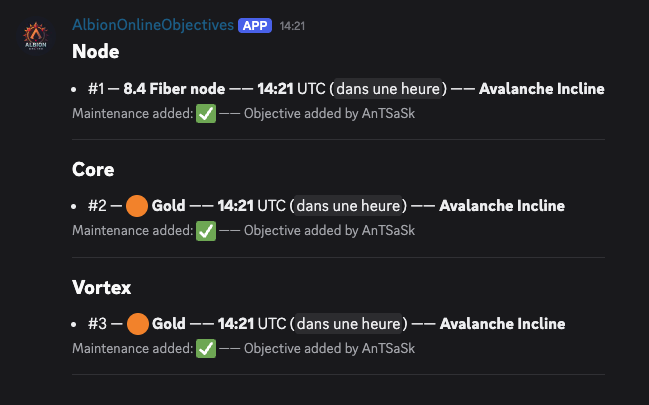
The /list command displays all active objectives for your server, grouped by category (Nodes, Cores, Vortexes, Ancient Lands Portals, Dragons); a section only appears when it holds at least one objective. Each entry includes the rarity, spawn time with live countdown, and map name. Ancient Lands Portal entries show their size (Small, Medium, Large) in place of a rarity, and Dragon entries show no rarity at all. If no objectives exist, the bot replies:
No objectives to display
Error Messages
Duplicate Detected
Message:
It appears that the objective you are trying to add already exists
Cause: Someone already reported an objective with the same type, rarity, and map within an 8-minute window (plus or minus 4 minutes of your reported time). This is intentional: Albion Online Objectives prevents the same objective from appearing twice when multiple scouts spot it.
Resolution: No action needed. The objective is already tracked. Run /list to verify it appears in the list.

Invalid Values
Message:
One or multiple value(s) are incorrect, please try again. If the problem persist, please contact the Bot Developer.
Cause: One or more of the four /add parameters failed validation. Common triggers:
- Type was typed manually instead of selected from autocomplete, resulting in a value not in the supported list
- Rarity does not match the selected type (e.g., entering
7.4for a Core, orGoldfor a node) - Map name was misspelled or not in the 276 supported maps
- Time uses a notation the parser does not recognise
Resolution: Re-run /add and use the autocomplete suggestions for type, rarity, and map. For time, several notations work (1h30, 90, 02:30); see the full list.
Invalid Time Format
Message:
Invalid time format. Accepted formats: 1:30, 02:30, 1h30, 1h30m, 1h 30, 1h 30m, 1h, 90, 45m, 90m
Cause: The time value could not be parsed. A bare number is read as minutes; 1h30 and 1:30 both mean one hour thirty.
Resolution: Use one of the notations listed in the message. The separators ;, . and , are tolerated as typos for :.
Time Out of Range
Message:
The provided time is out of the accepted range
Cause: The delay was parsed correctly but falls outside the accepted window. An objective is reported as a delay from now, bounded to 24 hours, except for Ancient Lands Portals, which are capped per size at 30 (Small), 60 (Medium) or 180 (Large) minutes. These caps are a typo guard, not a game rule; any lower value is accepted as-is. When the value is also malformed, the format error is reported instead.
Resolution: Enter a delay within the bound for that type (see time limits).
Invalid Type and Rarity Combination
Message:
This rarity is not valid for the selected type
Cause: The rarity does not apply to the objective type: tiers 4.4–8.4 belong to nodes, colours Green, Blue, Purple and Gold to Cores and Vortexes, and sizes Small, Medium, Large to Ancient Lands Portals. A Dragon takes no rarity at all: supplying one is rejected, while leaving the field empty for any other type is rejected too (see the five validation outcomes).
With /edit this check applies to the resulting combination: changing only the type can fail because of the rarity already stored on the objective.
Resolution: Supply a rarity that matches the type (or none for a Dragon), or change both together.
Missing Values
Message:
Something went wrong, please try again. If the problem persist, please contact the Bot Developer.
Cause: A required parameter was missing from the command. This typically happens due to a Discord client glitch rather than user error, since Discord enforces required fields.
Resolution: Try the command again. If the error persists across multiple attempts, restart your Discord client.
Objective Not Found
Message:
We cannot find the objective you want to remove
Cause: The index number you provided to /remove does not match any active objective. Either the objective was already removed by another user, it expired and was cleaned up, or the index number is incorrect.
Resolution: Run /list to see current objectives and their index numbers (displayed as #1, #2, etc.), then use the correct index with /remove.
Permission Denied
Message:
You don’t have permission to remove this objective!
Cause: You attempted to /remove an objective that was reported by another user, and you lack the required Discord permissions.
Who can remove an objective:
| Role | Can Remove |
|---|---|
| Original reporter | Their own objectives only |
| Users with Manage Messages permission | Any objective |
| Users with Administrator permission | Any objective |
Resolution: Ask the original reporter to remove it, or have a moderator or administrator handle the removal.
Channel Not Writable
Message:
I cannot post in that channel: the View Channel permission is missing. Grant it there, then run the command again.
Cause: You picked an announcement channel with /settings announcement-channel where the bot cannot post. The message names the missing permission: View Channel or Send Messages.
Resolution: Grant the named permission to the bot on that channel, then run the command again. Nothing is saved until the check passes, so your previous setting is untouched.
Cooldown Active
If you use a command too quickly after the previous one, Discord shows a cooldown notice. The bot enforces these delays:
| Command | Cooldown |
|---|---|
/add | 2 seconds |
/edit | 2 seconds |
/remove | 2 seconds |
/about | 2 seconds |
/list | 5 seconds |
Resolution: Wait for the cooldown to expire and try again.
Maintenance Flag
When an objective’s calculated spawn time crosses the 10:00 UTC daily maintenance window, Albion Online Objectives flags it in the /list output. This tells your guild that the objective may not survive the server reset.
- An objective flagged with the maintenance indicator means the game servers will restart before or around its spawn time
- The daily reset occurs at 10:00 UTC every day
- Objectives that spawn well before or well after maintenance are not flagged
Use this flag to avoid committing resources to an objective that may disappear during the server restart.
Announcement Messages
When a new version ships, the bot posts an announcement on your server. It goes to the channel set with /settings announcement-channel.
When no channel is set, the announcement falls back to the last channel the bot was used in, and carries this notice:
No announcement channel is set yet, so this message landed in the last channel where the bot was used. An admin can pick a dedicated one with
/settings announcement-channel.
Setting a channel removes the notice. Each announcement is sent once per server and never repeated.
An admin can turn announcements off entirely with /settings announcements enabled:false.
Welcome Message
When the bot joins a server, it posts a one-off welcome message introducing /add, /list and /settings, with links to this site and the legal documents. It picks the system channel when it can post there, otherwise the first writable text channel.