
/list — View Active Objectives
The /list command displays all active objectives reported for your Discord server. All server members can use this command.
Syntax
/listThis command takes no parameters.
Output
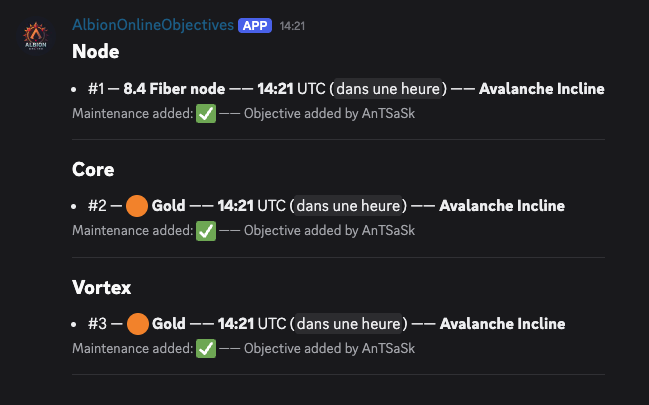
The bot responds with a message listing all active (non-expired) objectives, grouped into five categories. A category’s section only appears when it contains at least one objective; empty sections are omitted.
Categories
| Category | Includes |
|---|---|
| Node | Fiber node, Hide node, Ore node, Wood node |
| Core | Core |
| Vortex | Vortex |
| Ancient Lands Portal | Ancient Lands Portal |
| Dragon | Dragon |
Entry Format
Each objective entry displays:
- The index number, used with
/removeto delete entries - The rarity and type: the tier and type name for nodes (e.g.,
7.4 Ore node), an emoji and color name for cores and vortexes (e.g.,🟠 Gold), the size (Small,Medium,Large) in place of the rarity for Ancient Lands Portals, and no rarity segment at all for Dragon entries - The time, as the calculated spawn time in UTC and as a Discord relative timestamp (e.g., “in 2 hours”)
- The map name
- The maintenance flag:
✅means no maintenance between now and spawn time (safe), while❌means the 10:00 UTC maintenance falls in between (objective may be reset) - The reporter, shown as the server nickname of the member who added the objective, falling back to their global Discord name
Example Output
## Node ##
- #1 — 7.4 Ore node —— 14:30 UTC (<t:...:R>) —— Murdergulch Ravine
-# Maintenance added: ✅ —— Objective added by PlayerName

## Core ##
- #2 — 🟠 Gold —— 09:15 UTC (<t:...:R>) —— Hightree Enclave
-# Maintenance added: ❌ —— Objective added by PlayerName
The <t:...:R> timestamps are rendered by Discord as live relative countdowns (e.g., “in 2 hours”). The -# lines appear as small subtext in Discord.
Behavior
Auto-Cleanup
When you run /list, the bot filters out any objectives whose spawn time has already passed. Expired objectives are not displayed.
Additionally, a background task runs every 30 minutes to clean up expired objectives from the database and refresh the displayed message.
Message Refresh
Each time /list is called or the cron task runs, the bot updates the existing message rather than posting a new one, keeping the channel clean.
Cooldown
This command has a 5-second cooldown per user, longer than other commands because it queries the database and updates a message.
Related Commands
/addreports a new objective/removedeletes an objective by its index number- The Ancient Lands Portals & Dragon attacks guide shows how the two newest types appear in this message