
Report Your First Objective
This tutorial walks you through reporting your first Albion Online Black Zone objective. No configuration is needed; Albion Online Objectives (AOO) works immediately after installation.
Reporting an Objective
-
Open Discord and go to any channel where the bot has access.
-
Type
/add. Discord will show the command with its four parameters.
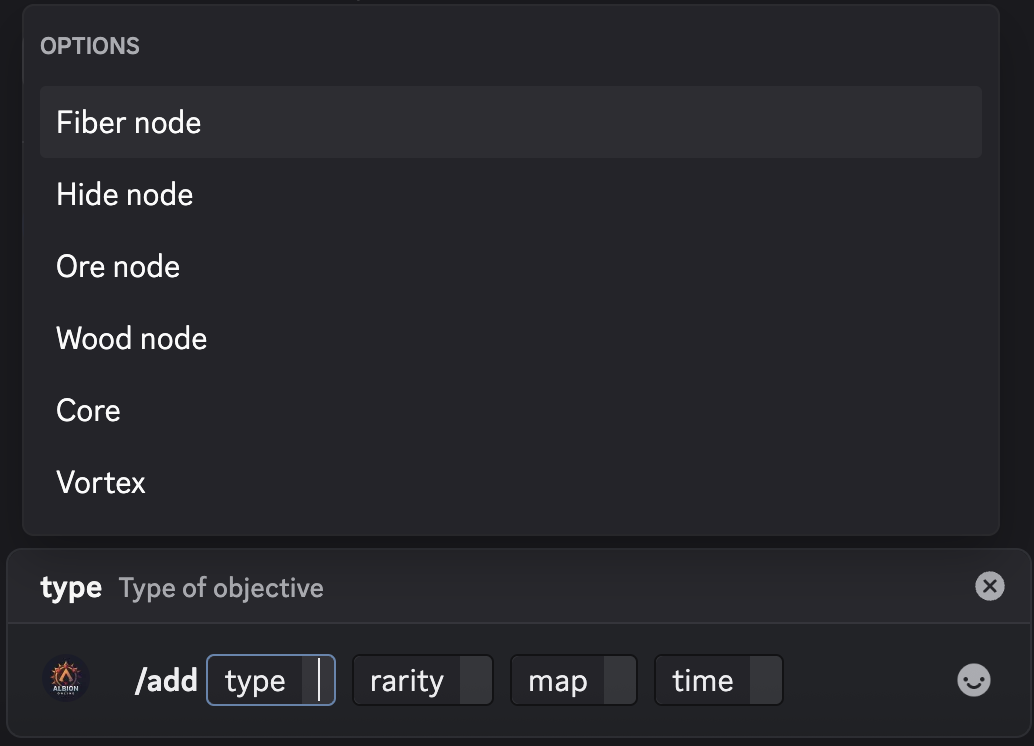
-
Fill in the parameters:
Parameter What to enter Example typeThe objective type (autocomplete) Ore noderarityThe rarity, tier, or portal size (autocomplete) — leave empty for a Dragon attack 7.4mapThe Black Zone map name (autocomplete) Murdergulch RavinetimeTime remaining until spawn — several formats accepted 1h30 -
Press Enter to submit. Albion Online Objectives confirms the objective was added.

Viewing Active Objectives
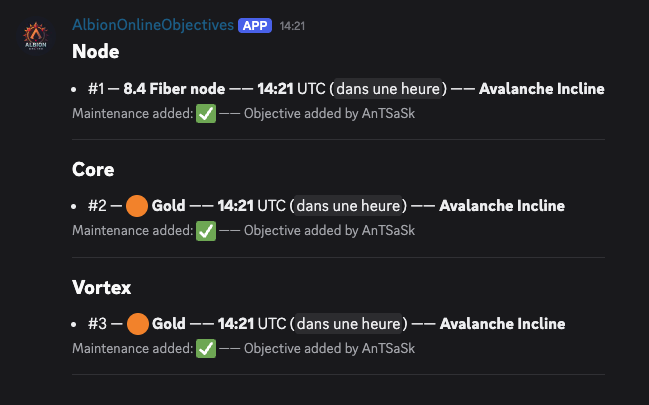
Type /list to see all objectives currently reported for your server. The bot displays them grouped into five categories: resource nodes (Fiber, Hide, Ore, and Wood), energy cores, vortexes, Ancient Lands Portals (timed portals in three sizes), and Dragon attacks.
Each entry shows the rarity (a size for portals, nothing for Dragons), time with a live countdown, and the map name.
What Happens Next
- If someone tries to add the same objective within an 8-minute window, the bot rejects the duplicate.
- Expired objectives are cleaned up automatically every 30 minutes.
- When the calculated spawn time crosses the 10:00 UTC daily maintenance window, the bot flags the objective.
Next Steps
- Learn about all objective types and rarities
- Discover the newest types: Ancient Lands Portals & Dragon attacks
- Browse the 276 supported Black Zone maps
- See the full
/addcommand reference for advanced details - Use
/removeto delete an incorrect entry