
/add — Report an Objective
The /add command reports a new Black Zone objective to your server’s tracking list. All server members can use this command.
Parameters
typechoiceRequiredThe objective type — one of 8 valuesraritychoiceRarity of the objective — leave empty for DragonmapstringRequiredBlack Zone map nametimestringRequiredTime remaining until spawn (e.g. 1h30, 90, 02:30)Syntax
/add type:<type> [rarity:<rarity>] map:<map> time:<time>Parameters
The type, map, and time parameters are required. rarity is optional at the Discord level, but the bot still expects it for every type except Dragon (see rarity validation below).
| Parameter | Type | Description |
|---|---|---|
type | Autocomplete | The objective type — one of 8 values (see objective types) |
rarity | Autocomplete | Tier for nodes (4.4–8.4), color for cores/vortexes (Green, Blue, Purple, Gold), or size for portals (Small, Medium, Large). Leave empty for Dragon. |
map | Autocomplete | Black Zone map name — 276 maps supported (see maps list) |
time | Text | Time remaining until the objective spawns. Several formats are accepted — see below. Example: 1h30 or 02:30 (2 hours 30 minutes from now) |
Type Values
| Type | Category |
|---|---|
Fiber node | Node |
Hide node | Node |
Ore node | Node |
Wood node | Node |
Core | Core |
Vortex | Vortex |
Ancient Lands Portal | Portal |
Dragon | Dragon |
Rarity Values
For nodes: 4.4, 5.4, 6.4, 7.4, 8.4
For cores and vortexes: Green, Blue, Purple, Gold
For Ancient Lands Portals: Small, Medium, Large. The size reflects the in-game group capacity (1–5, 5–7, and 15–20 players; see the portals and dragons guide)
For Dragons: none; leave the field empty
Rarity Validation
The bot checks that the rarity matches the chosen type’s family. Five outcomes are possible:
| Type chosen | Rarity supplied | Result |
|---|---|---|
| Rarity-bearing type (node, core, vortex, portal) | From its own family | Accepted |
| Rarity-bearing type | From another family | Rejected — invalid type and rarity combination |
| Rarity-bearing type | Left empty | Rejected — a rarity is required for this type |
Dragon | Left empty | Accepted |
Dragon | Supplied | Rejected — a Dragon takes no rarity |
Autocomplete
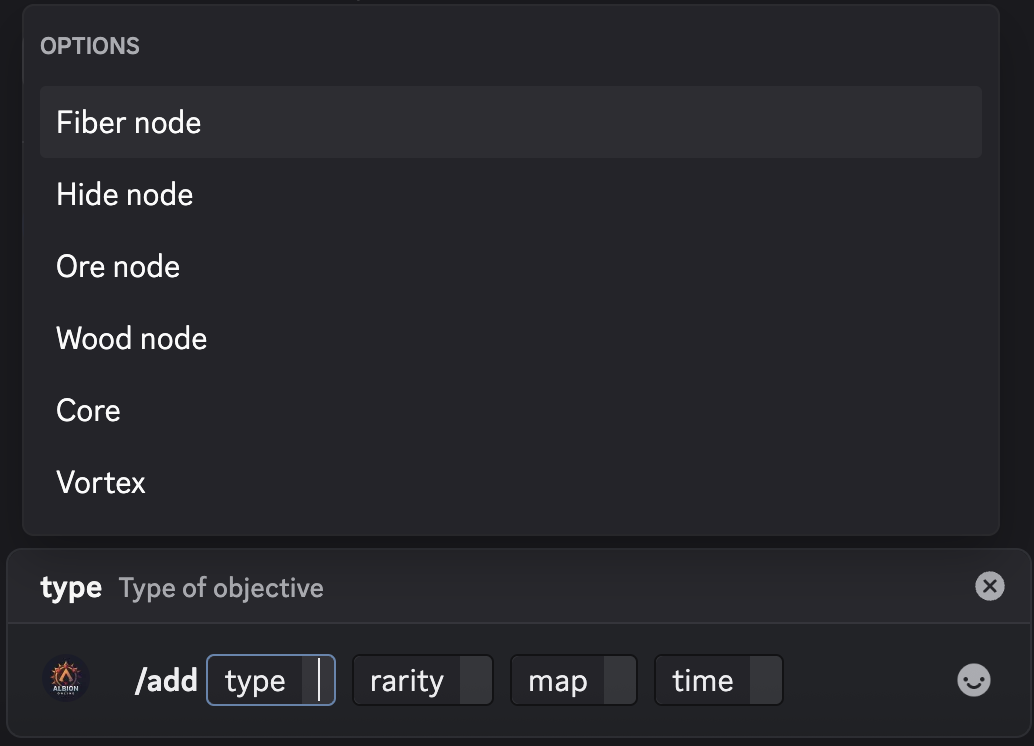
The type, rarity, and map parameters all support Discord’s autocomplete feature. Start typing and matching options will appear. For maps, the search matches anywhere in the name: beginning, middle, or end.
Additionally, the type and rarity fields are context-aware. The rarity autocomplete only offers the family of the type you already chose: tiers for a node, colors for a core or vortex, sizes for an Ancient Lands Portal. Once Dragon is selected, it offers nothing, since a Dragon takes no rarity. The filtering works the other way too: selecting a node rarity (4.4–8.4) filters the type list to nodes only.
Examples
/add type:Ore node rarity:7.4 map:Murdergulch Ravine time:02:30
/add type:Core rarity:Gold map:Hightree Enclave time:01:15
/add type:Vortex rarity:Purple map:Deepwood Gorge time:04:00
/add type:Ancient Lands Portal rarity:Medium map:Deepwood Gorge time:00:45
/add type:Dragon map:Everwinter Peak time:1h15
Behavior
Duplicate Prevention
If an objective with the same type, rarity, and map already exists within an 8-minute window (±4 minutes of the reported time), the bot rejects the new report and notifies you. This prevents accidental duplicates when multiple guild members spot the same objective. Dragons are covered like any other type: a second Dragon report on the same map within the window is rejected.

Maintenance Detection
Albion Online’s daily server maintenance occurs at 10:00 UTC. If the calculated spawn time crosses the 10:00 UTC daily maintenance window, the bot automatically flags it. This tells your guildmates that the objective may not survive the server reset.
Cooldown
This command has a 2-second cooldown per user.
Accepted time formats
The time parameter accepts several notations. A bare number is always minutes.
| Input | Interpretation |
|---|---|
1:30 | 1 hour 30 minutes |
02:30 | 2 hours 30 minutes |
1h30 | 1 hour 30 minutes |
1h30m | 1 hour 30 minutes |
1h 30 | 1 hour 30 minutes |
1h 30m | 1 hour 30 minutes |
1h | 1 hour |
90 | 90 minutes |
45m | 45 minutes |
90m | 90 minutes |
The value is a delay from now, never a clock time. Unrecognised formats are rejected with an error message listing the accepted ones.
Time limits
The accepted delay is capped per type. For Ancient Lands Portals the cap depends on the size; every other type uses the general 24-hour limit:
| Type | Maximum delay |
|---|---|
Ancient Lands Portal — Small | 30 minutes |
Ancient Lands Portal — Medium | 60 minutes |
Ancient Lands Portal — Large | 180 minutes |
| All other types | 1440 minutes (24 hours) |
These caps are a typo guard, not a game rule: they catch slips like typing 100 instead of 10. Any lower value is accepted as-is, and the bot never derives an opening time from a portal’s size: a portal spotted late is reported with whatever time actually remains. When a time value is both malformed and out of range, the format error is reported first.
After Reporting
Once added, the objective appears in the /list output. To remove an incorrect entry, use /remove.